Browse docs
Release notes
What's new in spinbook
Release notes for spinbook: new features, improvements, and fixes, updated with every release.
September 25, 2026
- The playlist page got a big cleanup. Album art and clutter are gone, song rows are one tight line each, search has a clear button, and importing and AI ideas open in tidy dialogs with the "playlist must be public" rule stated up front.
- Drag songs into order. Grab any song and drop it where it belongs; phones keep the arrows.
- One handover method per list. Every list is exactly one thing: songs built in the portal, a link to a playlist anywhere, or uploaded files. The choice sits right on the list, any method completes the checklist item, and all of them reach the DJ's print sheet.
September 24, 2026
- Checklist changes never go unnoticed, and nobody gets flooded. Edits you make collect in a banner on the event page; one press emails the couple one summary covering everything, or mark it as told if you covered it on a call. Nothing auto-sends.
- One email when your couple has been busy. When a couple works through their checklist, you get a single email per event listing everything they did, sent after they finish. Never one email per click; turn it off in Settings → Notifications.
- Every event keeps a change log, powering those updates and the event's history.
- Playlists became lists you shape. Every event starts with Cocktail hour, Dinner, and Dancing; rename them, remove them, or add your own, up to ten. Playlists live in the portal as the song list your DJ works from, with Spotify as the search and import source; nothing is created in anyone's Spotify account.
September 23, 2026
- Marking a payment paid now asks how. A small prompt collects the method, the confirmation number, and (for staff) a receipt screenshot. Skip it all and a gentle warning lets you mark it paid anyway; your books just won't say how.
- Couples get the Celebrate button too. When every checklist item is done, one press replays the confetti whenever the mood strikes.
September 21, 2026
- Edit any payment. Every payment row has an Edit screen: label, amount, due date, method, and confirmation number, including rows already marked paid, so fixing a reference never means unmarking a payment. Edits fire a
payment.updatedwebhook with the previous values so your integrations follow along. - Attach a receipt. Screenshot the PayPal, Zelle, or Venmo confirmation and keep it on the payment record. Private to your team.
- Scan-to-pay QR codes. On a bigger screen, the couple's pay page shows a QR for the card link, Venmo, and PayPal, so they can scan with their phone and pay in the app they already use.
- Pick which events a webhook receives. New endpoints can subscribe to specific event types, and any recent delivery can be re-sent with one click. The endpoint cards got a cleaner layout with a copyable URL and a rename.
- Every auto-filled contract field is editable from the contract page. The new Event details panel edits the couple's names and address, the venue, the package, and the date and time, writing to the real event record so the contract, the event page, and your documents always agree.
- Filled merge fields render bold in contract previews, so you can see at a glance what was auto-filled. The couple sees plain text, and signed contracts are never changed.
- The contract preview now leads the settings page at full width, and Gemini and Grok join Claude and ChatGPT in the AI drafting links.
- A Celebrate button caps a completed checklist. One press replays the confetti and emails your couple a congratulations.
- Already signed in? The login pages now take you straight to your portal.
- Finishing the planning form lands the couple back on their portal with a celebration, optional sections are labeled instead of pre-checked, and the playlist link opens in a new tab so nothing is lost.
- A couple with no events yet gets a booking-form button instead of a dead end.
- Calendar: hide completed items with one tap, and dates beyond this year show their year.
- Completed setup steps stay clickable, the getting-started pill moved top right, and settings pages show loading skeletons.
- Every dropdown wears the brand chevron.
- Fixed: planning section headings are readable at print size.
September 18, 2026
- Pay-to-book. Lock in the deal from your sales call with a booking offer: the couple gets one link to review the terms and pay the deposit, no login needed, and the booking confirms itself once the money is real. Card payments confirm on their own; Venmo, PayPal, and Zelle show as claims until you confirm they arrived.
- Instant quotes hand straight into pay-to-book, so a quote confirmation shows the same Reserve your date button.
- Booked calls become leads automatically, like every other front door into your business.
September 4, 2026
- Weekly and monthly digests. A short summary of what happened across your events, delivered to your inbox on the cadence you pick. Tune or turn them off in Settings → Notifications.
- A copy polish across every screen and email, so the whole product reads a little cleaner.
September 3, 2026
- Three playlists for every wedding. Couples now build a separate list for cocktail hour, dinner, and dancing, and each one syncs to its own Spotify playlist so you can cue them independently. Songs you'd already collected stay put, in the dancing list.
- Couples can save playlists to their own Spotify. Their three playlists get built in their account, where they'll go looking for them, and your library stays yours. Connect your own account and it's used for any couple who doesn't link theirs.
- Paste a playlist you already made. Couples drop in a Spotify link and the songs come straight across, instead of re-picking them one at a time.
- Song ideas from AI. Not sure where to start? Describe the vibe, open a ready-made prompt in Claude or ChatGPT, and paste the list back. We'll find each song on Spotify.
- Fixed: song search came up empty for everyone whose DJ hadn't connected Spotify. Search now works straight away, with no Spotify account needed from anyone.
- Invite your team. Settings → Team lets you give other DJs and staff their own logins.
- Emailed receipts on every payment, plus clearer detail on paid rows.
- Checklist items now fire
checklist.item_completedandchecklist.item_updatedwebhooks, so later edits reach your automations too. - One-tap payment request emails. Press Request Payment and the couple gets a branded email with the amount, the due date, and every way to pay you accept. Works from the org-wide Payments hub too, and due requests there now link straight to their event.
- A clear sent-or-failed confirmation after every payment request, with a sending overlay so a double tap can't send it twice.
- Webhooks carry more:
payment.paidincludes the couple's contact plus the total and remaining balance, and checklist events include signeddoc_urlPDF links that expire after an hour and re-mint on demand. - Fixed: planning PDFs render complete, and re-saving a form without changes no longer fires webhook events.
- Fixed: payment rows lay out cleanly, with method and confirmation inputs on the event page.
September 2, 2026
- Fixed: email links work on any device. Password resets and magic-link sign-ins now verify wherever you open the email, not just the browser that requested them
- Open Gmail / Open Outlook buttons on every check-your-email step jump straight to the message
- Card payments alongside Venmo/PayPal/Zelle: payment requests can carry a "Pay by card" checkout link from your own payment processor, wired up through the new
payment.requestedwebhook and Payments API (see /docs) - "Book With Us": a clearer public booking form with a friendlier intro and a "Send Booking Request" button
- Skeleton loaders and playful loading screens across the portal. Pages show progress instead of going blank
- A warmer first day: welcome note on your new dashboard, a floating "Getting started" pill so the setup checklist can never be lost, and the spinning vinyl standing in until you upload your logo
- Same business name, no problem. Signups no longer collide over a name; each business gets its own link
- Fixed: repeated password-reset requests now say they're rate-limited instead of pretending an email was sent
August 28, 2026
- New: a Getting started checklist on your dashboard. The setup path from new account to shareable business in about 25 minutes. Each step checks itself off as you set up your booking form, pricing, contract, client checklist, and call schedule, ending with copy-and-share buttons for your booking link, public page, and call schedule. It lives permanently at Settings → Getting started.
- Stronger passwords. Everywhere a password is set now asks for 12+ characters and rejects easy-to-guess choices, including ones built from your own name or business name.
- Fixed: the signup form now asks plainly for your "Business / DJ name", with the example text removed.
August 24, 2026
- Rate limiting on public forms, sign-in, and the API: keeps bots and brute-force attempts out without slowing real couples down.
- A stricter Content-Security-Policy now ships on every page, part of the same security review.
August 21, 2026
- Signup now confirms your email. Click the link we send and you land signed in on your new dashboard. Until then the password stays inactive.
- Contracts: add your own merge fields. Declare custom fields to get a real label in the token palette, and set business-wide default values that fill in automatically (each event can still override them).
- Instant quotes got a cleaner flow: couples see the itemized price after they submit, and your quote page now has its own QR code.
- Your booking link sits at the top of the dashboard with one-click copy, a prefilled email, and the QR code for flyers.
- Settings polish: a public-page on/off switch, hex inputs on the color pickers, and the booking form moved up the settings list.
- Security hardening from our August review: tighter tenant isolation, webhook protections, and log redaction.
- Fixed: the header logo no longer wraps or oversizes on phones.
August 19, 2026
- Every DJ now has a branded public landing page at spinbook.io/your-name: availability checks, your booking form, and your contact details behind one shareable link.
- New free guide: Set up your DJ business with AI. A two-page PDF with three steps and one-click prompts for Claude, ChatGPT, or Grok (and a copy-and-paste page for Gemini), plus the wedding coordination checklist we run spinbook on. Grab it on the home or pricing page; it lands in your inbox too.
- Your dashboard counts down to the big day, and the page around it has been tidied up.
- Feedback you send now shows where it got to: Received, On the list, Shipped, or Not planned, along with any note we've left on it.
- New DJs get a confetti welcome the first time their dashboard loads.
- Simpler "Start Free" sign-up buttons, and "Get a demo" now books a real demo call.
- Sign-in pages now carry the spinbook logo with a way back to the homepage.
- The privacy policy and terms of service now live at spinbook.io/privacy-policy and spinbook.io/terms-of-service.
- Fixed: a handful of small rough edges caught by early-user feedback.
August 12, 2026
- Your couples now meet their DJ at the right moment. Assign a DJ to an event and spinbook introduces them (name and phone) a set number of days before the day itself, not months early when the roster can still change. Set the lead time and the wording in Settings → Default checklist, and release the contact early on any event if a couple needs it.
- Give couples a head start on their music. Curate a playlist for each moment (first dance, cocktail hour, cake cutting) and couples can add one to their list in a click, then make it their own. Add yours in Settings → Playlist Generator.
- Couples can ask for songs Spotify doesn't have. A title, an artist, and a note. They come through with the rest of the list, so a live cut or a local band no longer falls through the cracks.
- The event document now includes the music: picked tracks and requested songs, in the couple's order, alongside the timeline you run the night from.
- Write your own words above a couple's checklist. One message while they're still working through it, one for when they finish, or turn either off. The deadline line now reads "Checklist completed on…" instead of vanishing when the last item is ticked.
- Ticking things off is a bit more fun. A small spray of confetti per item, and a proper celebration when the checklist is done. Respects your device's reduce-motion setting.
- Feedback has a home. Everything you and your couples send with the Feedback button is now listed under Settings → Feedback, with screenshots and the page each note came from.
- New guide: Use spinbook with your AI assistant. One click hands Claude, ChatGPT, or Gemini a prompt that turns it into a setup helper for your DJ business, grounded in these help pages.
- Pricing is clearer: you don't pay until a real client books a real event, and the Playlist Generator is part of your plan rather than an add-on.
- "View as client" and "Share Event" are now proper buttons on the event page.
- The help site carries the spinbook wordmark and a footer with quick links to guides, what's new, the API, privacy, and terms. The API reference shows the spinbook icon in your browser tab.
- Fixed: if spinbook updates while you have a tab open, the page now tells you to refresh instead of showing a generic error you couldn't get past.
- Fixed: a hiccup loading your portal no longer shows "Page not found" as though your account didn't exist.
August 11, 2026
- spinbook is free until your first real booking. Set up your portal, brand it, and try everything end to end with test bookings. You pick a plan when a real client books. Set a designated test email in Settings → Booking form.
- Your subscription now lives right on your Account page: plan, checkout, invoices, and receipts in one place.
- Cancel (or un-cancel) any time, right from your Account page. Your portal stays open through the period you've paid for.
August 6, 2026
- Add your own blanks to a contract template and fill them in per client. Write
{{city}}anywhere in your template and it becomes a box on that couple's contract. No more emailing PDFs back and forth. - See any event exactly as your client sees it, with View as client. Look around their portal safely, then switch back. Nothing can be changed while you're in there.
- Your default checklist now includes a playlist step, and it ticks itself off however the couple shares their music: a link, an uploaded list, or songs picked in the portal.
- Connecting your Spotify account works again.
- Expired sign-in links now explain what happened and offer a fresh one, instead of bouncing you to a blank login page.
- You can now search the help site. Press
/from any page, or use the search box at the top. - Invoices have proper numbers now (SB2543-0001…), and checkout errors explain themselves.
- Webhook deliveries are signed, so your automations can verify each one really came from spinbook and wasn't altered on the way.
August 4, 2026
- We have a new name and home: spinbook, at spinbook.io. Same app, same features, new address.
- Subscriptions are live. Pick the Standard plan at $49/month, or $468/year (two months free), and pay securely through Stripe from the new Account → Billing page. Your card details never touch spinbook, and sales tax is calculated automatically at checkout.
- Invoices and receipts, right where you'd look. The Billing page lists every charge with its status. View any invoice on Stripe or download the PDF for your records.
- The spinbook home page got a refresh. Start a free trial in one tap, see why DJs switch, and find our privacy policy and terms in the footer.
- The Feedback button is back: send us a note (with a screenshot) from any page. Every portal page now has a footer with help, guides, and support links.
- Save spinbook to your phone's home screen and you'll get the vinyl icon and spinbook name, not a generic letter.
- Couples never need a password. Any sign-in or reset link we email now takes you straight to your portal.
- Booking forms grew custom questions, UTM attribution, and a live link to your booking page.
- Payments hub polish: confirmation numbers, hub-first navigation, and an export API.
- Brand touches: wordmark v2 with the gold-dot period, a steadier spinning vinyl, and email logos that no longer render as blue links.
August 3, 2026
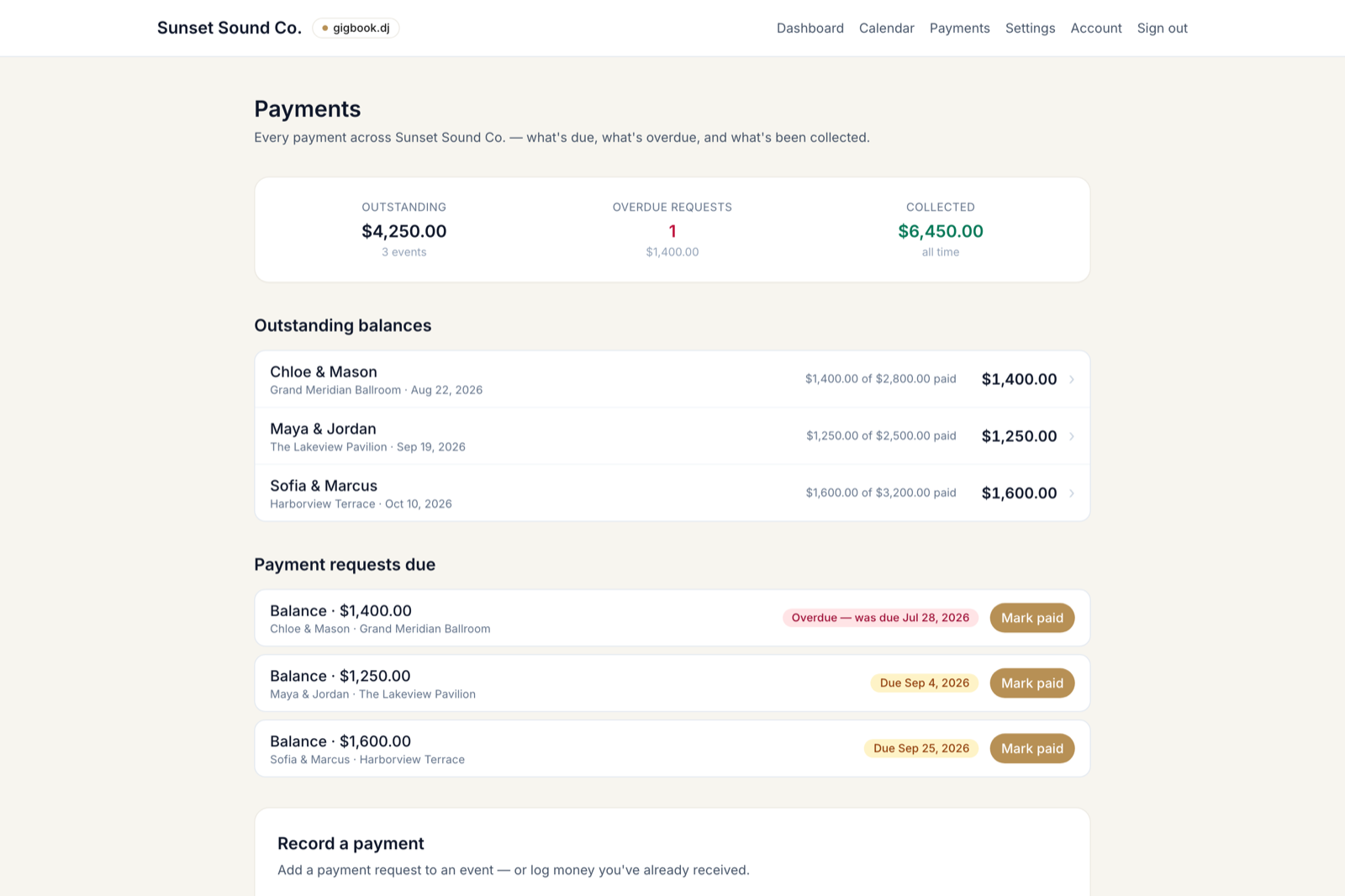
- Payments central. A new Payments page in the DJ nav tracks money across every event: outstanding, overdue, and collected totals; every pending request soonest-due first with one-click mark-paid; and a record-a-payment form that works on any event, including logging money you've already received.
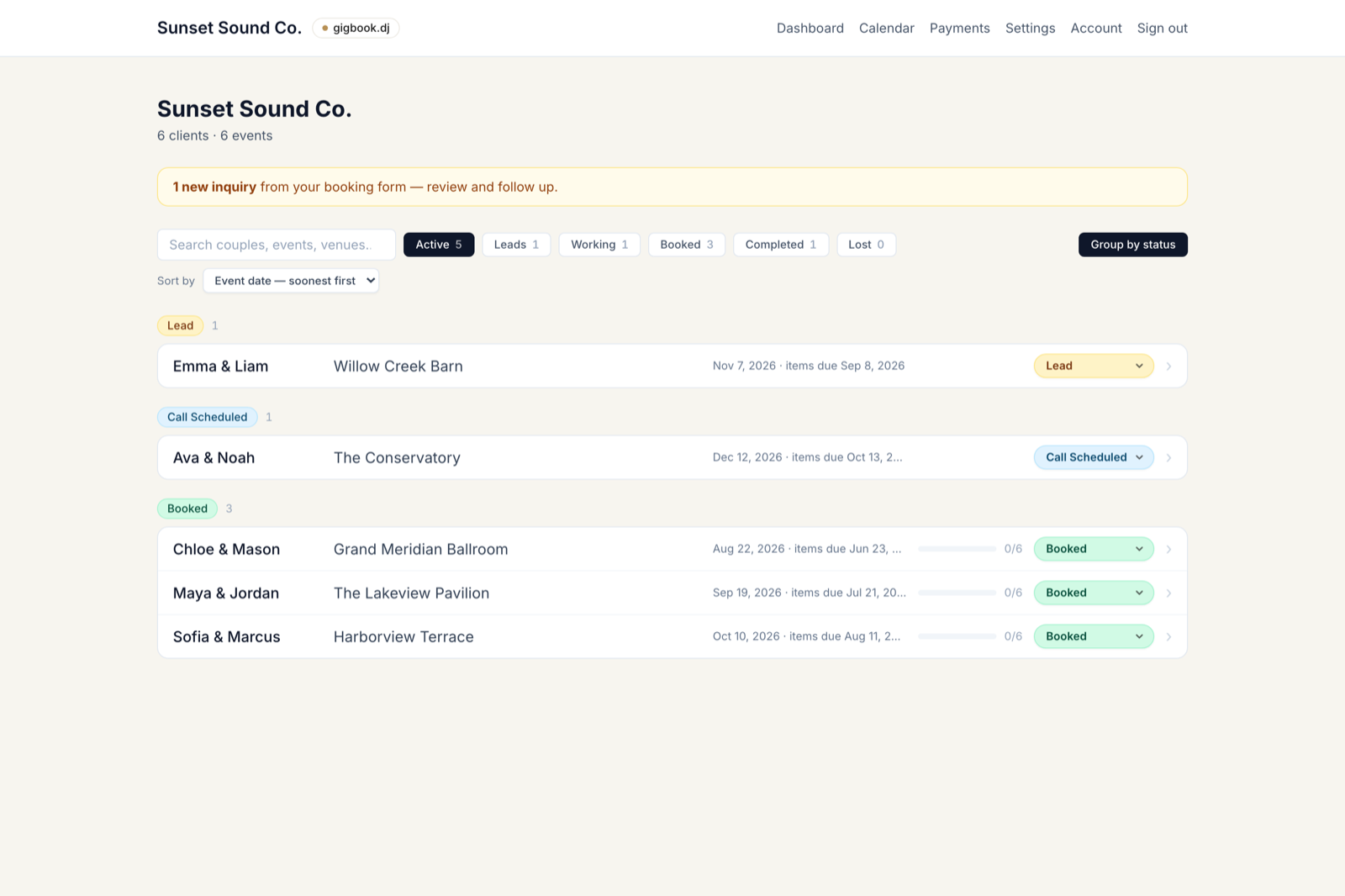
- Search everywhere. The dashboard and the calendar both have a search box now. Type any part of a couple's name, event, or venue. The dashboard can also group events by status in your own pipeline order (or stay one sorted list).
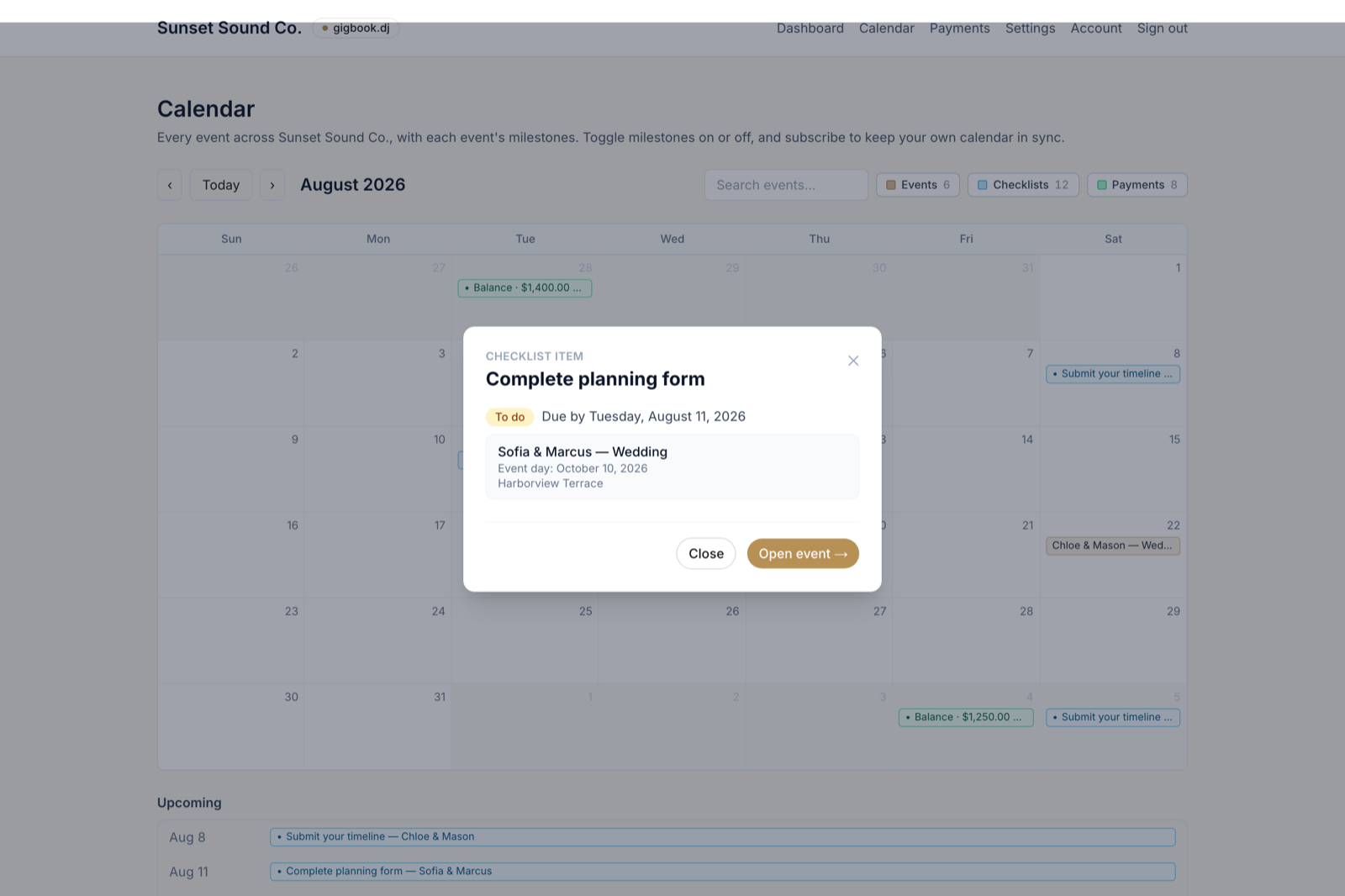
- Calendar previews. Clicking a checklist item on the calendar now opens a preview right there (due date, done state, and which event it belongs to) instead of navigating away.
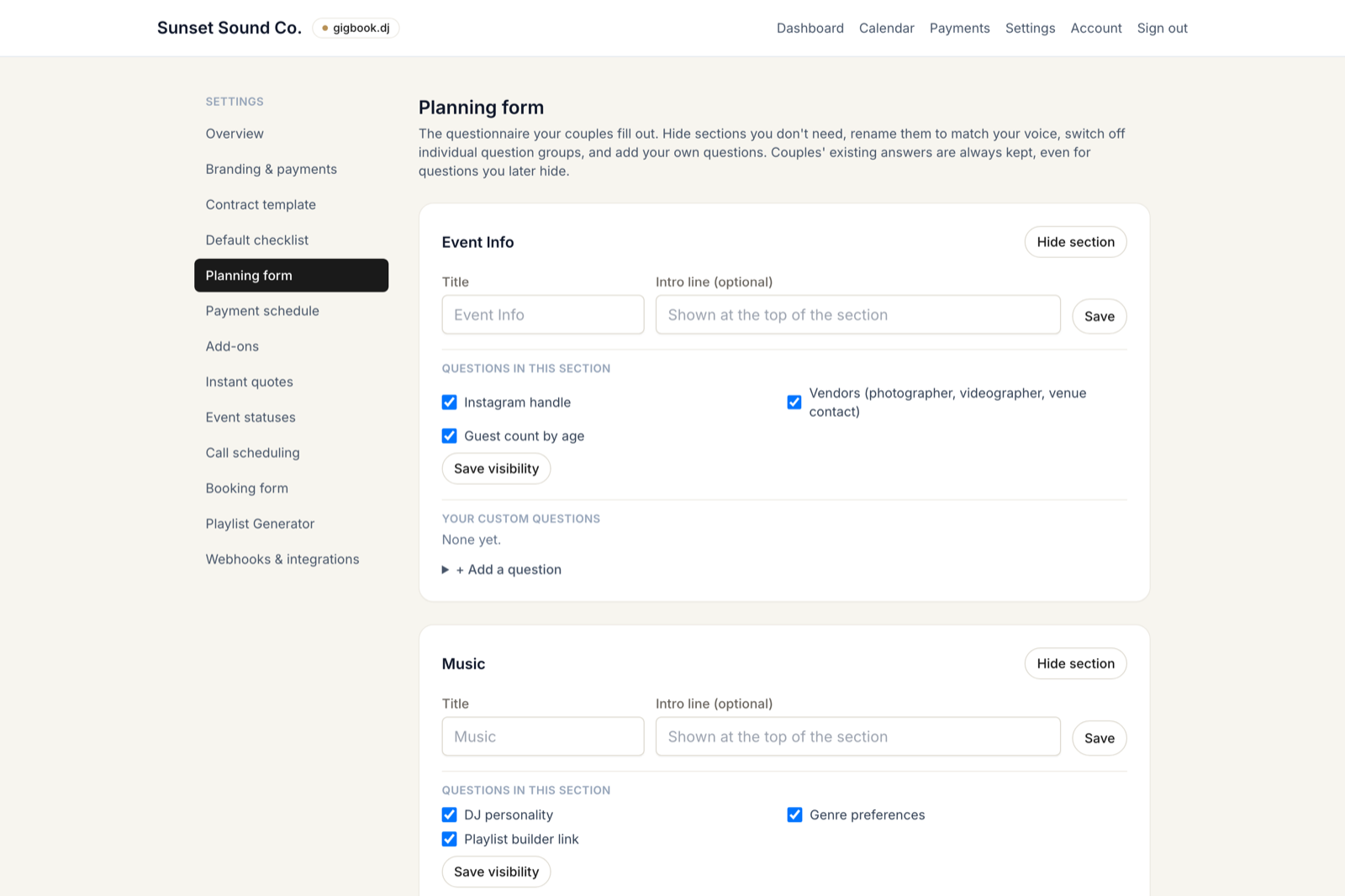
- Make the planning form yours. Settings → Planning form: hide or rename sections, switch off question groups, and add your own questions (even required ones) to any section, plus an extra all-your-own section. Couples' answers are never deleted, and progress follows the form you actually show.
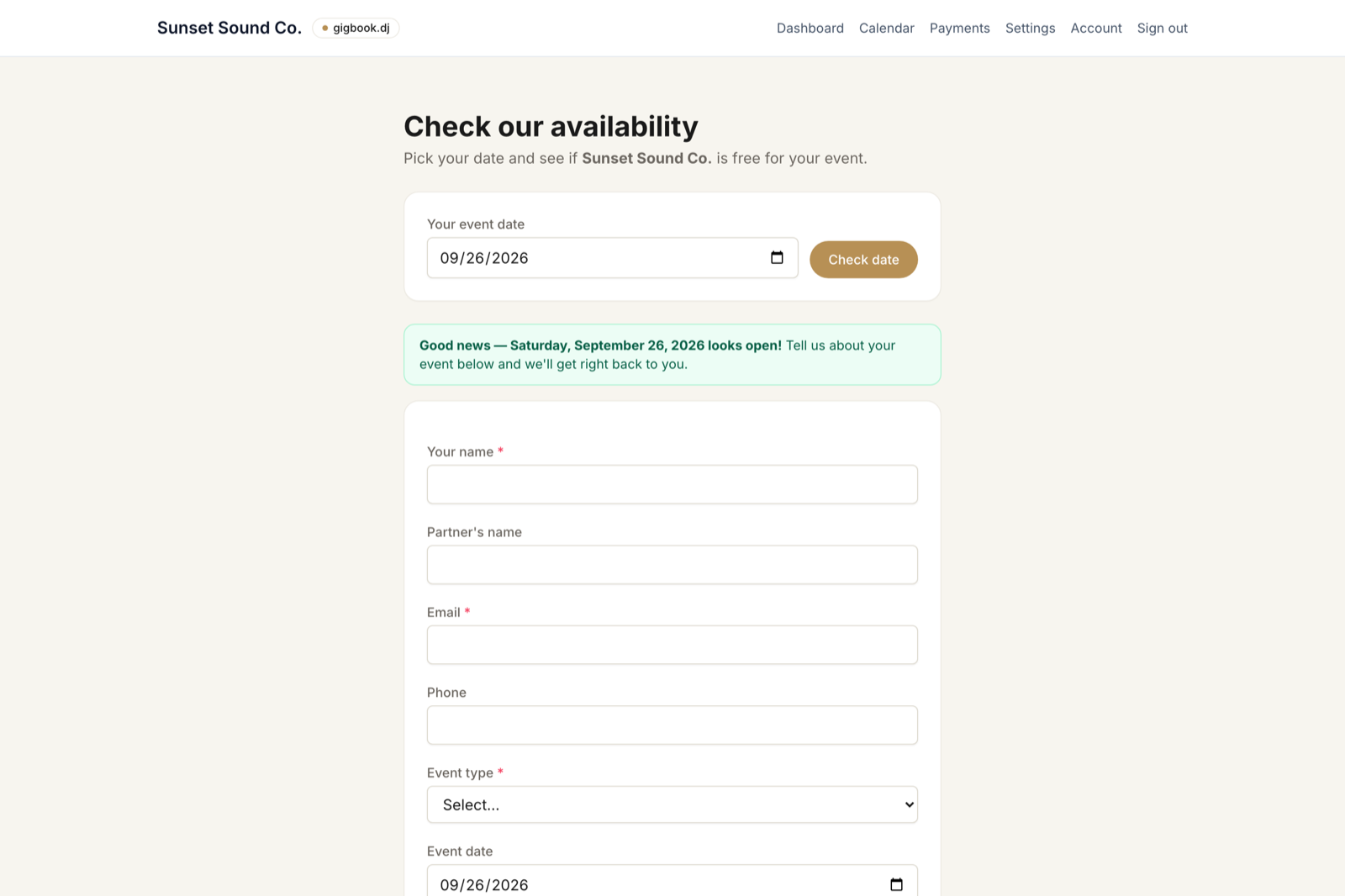
- Availability checker. A public date-first page at
/your-slug/availability: couples pick a date and get an honest answer from your real calendar, then their details land in your lead pipeline with the checked date attached.
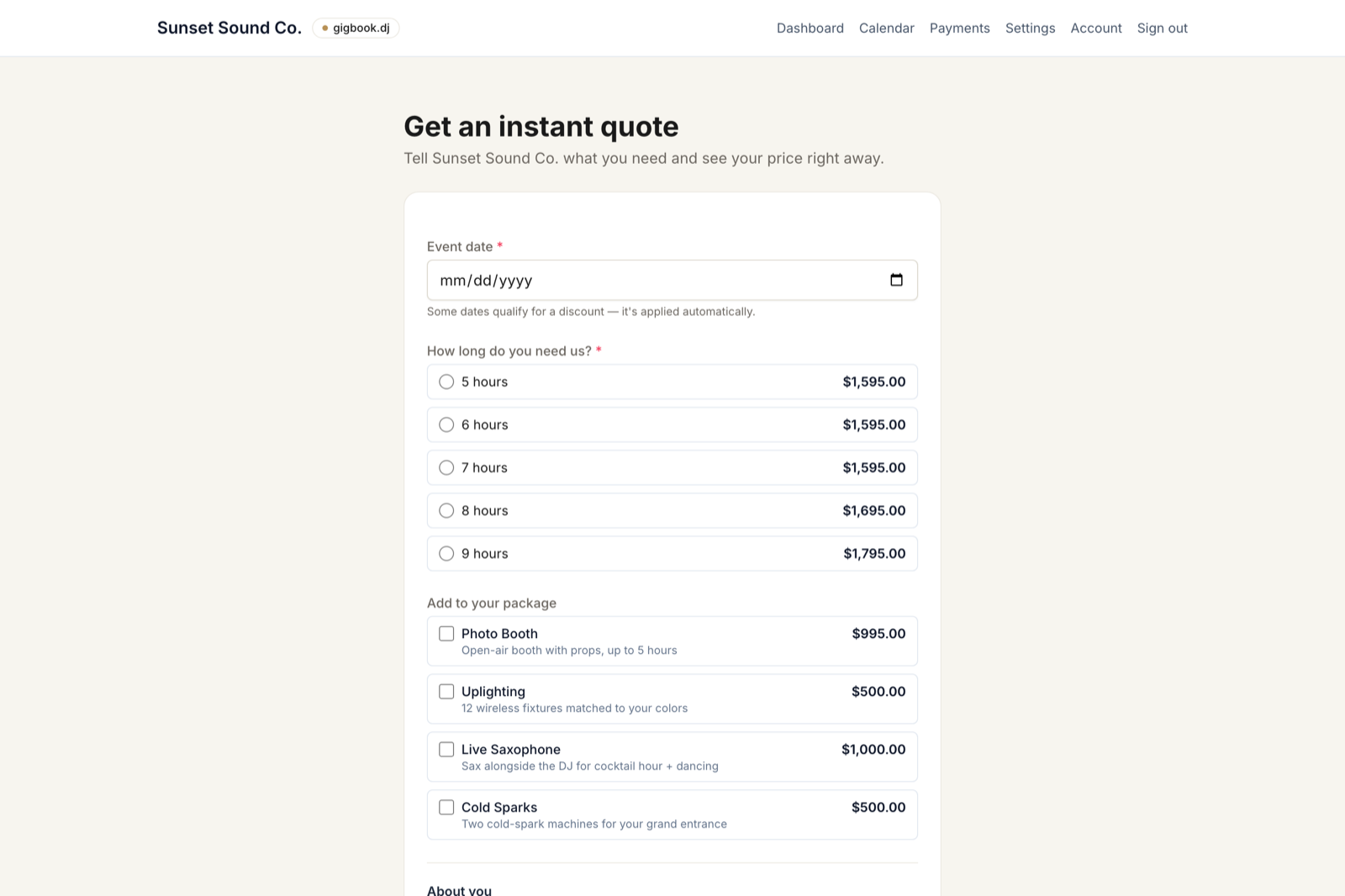
- Instant quotes (opt-in). Price your package by hours, let couples add offerings from your add-ons catalog, and apply date discounts automatically. They see the number immediately, and the lead arrives with the quote already on it.
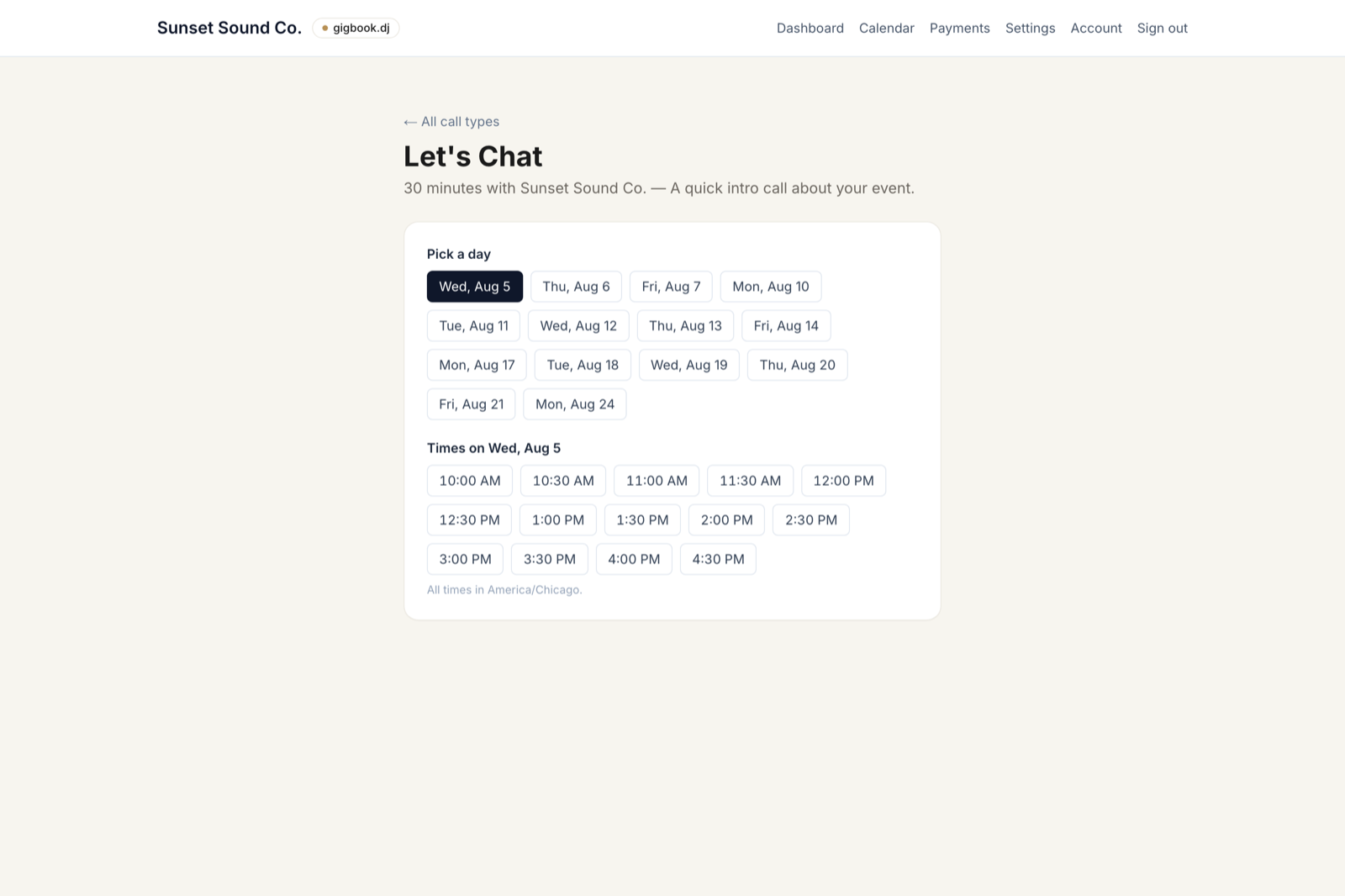
- Book calls with you. Calendly-style scheduling at
/your-slug/schedule: your call types, your weekly windows, your timezone. Days you have a gig are blocked automatically. Confirmations go to both of you by email.
- Playlist Generator. Connect Spotify in Settings and couples can build their event playlist right in the portal. Search, pick, and order songs, with a generated segment-ordered playlist on your account. Already have a playlist elsewhere? Paste a link or upload a song list instead.
- Reception timeline, rebuilt. Opens with a row ready to fill in, 5-minute time steps, autosave as you type, Sort by time on demand, + Insert between rows, and a Submit timeline button that checks it off the list (editable and re-submittable after). You can also attach a timeline document for your DJ (a planner's PDF, a photo of a handwritten schedule).
- Contracts got smarter. The template editor shows a live preview as you type; couples see their contract fill in as they enter their details; and the editor can draft a template with AI. It builds a prompt for your business that you take to Claude or ChatGPT and paste back, so spinbook never sends anything to an AI service itself.
- Automatic payment schedules. Mark an event booked and the deposit and balance requests are created for you using your standard terms (Settings → Payment schedule: 50% to book and the balance 15 days out unless you say otherwise).
- Checklist niceties. Custom items can carry a link that opens in a new tab; removing an item is always undoable; each item shows its own due date with overdue ones standing out.
- Settings sidebar. Pick a section on the left, edit on the right, and every section has its own bookmarkable address.
- Fixed: magic-link sign-in repaired, plus a DJ forgot-password flow.
July 22, 2026
- Customize your booking pipeline. Event statuses are now yours to shape. Rename them, recolor them, reorder them, or add your own in Settings → Event statuses. Every account starts with a ready-made set (Lead, Call Scheduled, Called, Booked, Not Booked, Not a Fit, Cancelled, Completed). Each status maps to a behavior, so the couple's portal still unlocks automatically when you mark an event booked.
- Sell add-ons. Build a catalog of optional priced upgrades in Settings → Add-ons. Couples pick the ones they want from their portal, and the total rolls straight into their amount due, paid with your usual payment handles.
- Cleaner payments for couples. The couple's payment view now leads with what they owe and the ways to pay it, instead of your behind-the-scenes tools.
- Contract details are filled before signing. Couples now complete the required blanks (like their address) right on the contract, and can't sign until they're done, so a signed contract is always a complete one.
- Planning form refresh. New ceremony questions up top (music, audio, on-site vs. off-site with an address field), an optional Cocktail Hour tab for a Spotify playlist link, first-name prompts for the Grand March pairs, and a tidier tab order.
- Reception timeline gets its own page. Build your minute-by-minute reception flow on a dedicated Timeline page, no longer buried inside the planning form.
- Easier navigation. A clear "Back to Client Portal" link now sits at the top and bottom of every checklist page.
- New Calendar for DJs. See every event and its milestones on a month view, and subscribe your Google, Apple, or Outlook calendar with a private link. Couples get a Timeline of what's due when, subscribable too.
July 9, 2026
- The couple's event page now shows a live countdown ("N days to your wedding") that flips to "Today is the big day" on the day and "This event has passed" afterward.
- The couple's "Make a payment" step is now "Remaining Balance" and shows exactly what's left to pay at a glance.
- The event page's "Booking form" section now matches the look and spacing of the checklist below it, using your portal font.
- A new booking.updated webhook sends the full, current booking details whenever a couple's booking answers are edited, so Make/Monday/Zapier stay in sync without an extra API call.
- New Reception Timeline in the planning form. Add each moment (time + activity, from a preset list or your own), reorder them, and print a clean one-page timeline sheet so your DJ can run the night.
- Cleaned up the event "Booking form" toggle on mobile, with a proper chevron icon and tighter spacing.
- From an event's planning, payments, contract, or booking page, "Back" now returns you to that event instead of the full dashboard.
- The event status selector is now a cleaner, color-coded pill that matches the rest of the app.
- Settings is tidier. "Branding & payments" is now a collapsible section, sitting between Booking form and Webhooks.
- Your booking form now has a downloadable QR code in Settings → Booking. Print or share it so couples can scan straight to your booking form.
- Deleting a checklist item now asks you to confirm first, and the delete control is a clear red trash icon. No more accidental deletions.
- The booking-form question editor is far more compact, and your booking QR code / link now always point to your live domain instead of localhost.
- Sign-in links now always point to spinbook.io, no matter which domain you opened the app from.
- Booking confirmation emails now send reliably from the live site.
- Booking confirmation emails now link to your live spinbook.io event page.
- Couples with more than one event now see a clean picker to choose which to open. Archived events are hidden, and completed events are clearly marked "Completed".
July 8, 2026
- The event page's booking section is now called "Booking form", sits just below the couple's name and date, and starts collapsed. Expand it when you need to review or edit what the couple submitted.
July 2, 2026
- Better contracts: new accounts start from a complete DJ services agreement, and the template editor now shows a palette of merge fields you click to copy (couple, date, time, venue, package, totals, and more) so it's easy to drop them into your wording. Fields fill in automatically per event, and the event time and package now merge in correctly.
- Cleaner default checklist: in Settings you can now disable default items instead of deleting them, so you never lose a core step (re-enable anytime). The final payment step is now "Make a Payment" and checks itself off automatically once the balance is paid in full.
- Payment step needs a total: the "Make a Payment" item stays open until you set a quoted total (even $0, but you have to enter it), so it only marks done when the full amount is actually collected.
- Sharper dashboard: the Active filter now hides completed events too, not just archived, so your client list shows only live work. Completed and Archived each still have their own tab.
- Clearer event page: the checklist is now headed "{Event Type} Checklist" (e.g. "Wedding Checklist"), with matching copy, and the booking-request panel lines up with the checklist.
- Works on your phone: the portal now has a hamburger menu on small screens, the help site gets a "Browse docs" menu on mobile, and a round of responsive fixes so pages read cleanly on a phone.
July 1, 2026
- Planning form, polished: from real DJ feedback: every song pick now has separate Song and Artist fields (no more guessing which version), the Grand Entrance uses simple Yes/No toggles, Toasts get their own section, and Latin joined the music genres.
- Payments hub: the payments tab now shows the quoted total, amount paid, and remaining balance at a glance, right above your full payment history. Deposit and balance roll up into one "Make a payment" step for couples.
- Connect your other tools: send spinbook events (new inquiry, signed contract, payment, completed planning form) to Make.com, n8n, or Zapier. Each request carries a secret token your receiver checks, so Monday and the rest of your stack stay in sync automatically. No double entry. Set it up in Settings → Webhooks & integrations.
- Help & docs: launched the public help site at support.spinbook.io, with step-by-step guides for bookings, contracts, payments, planning, and the API.
- Booking form fix: fixed an error some couples hit when submitting the public booking request form.
- Release notes: this page: see what's new each time spinbook is updated.
- Track every booking's status: move events through a clear pipeline (New inquiry → Booked → Completed, and more) with a status dropdown on your dashboard and each event page. New inquiries are highlighted so you never miss a lead, and the couple's checklist and planning tools now switch on only once you mark an event Booked, so unconfirmed inquiries stay clean. Click a new inquiry to preview the full form the couple submitted, edit any answer, and book it in one step, without leaving your dashboard. The whole submission also lives under a "Booking request" section on every event page, editable anytime.
- Filter your dashboard by stage: new pills at the top of a more compact client list (Active · New · Inquiry · Booked · Completed · Archived), each with a live count, so you can jump straight to just your new leads or everything you've booked. Archived events tuck out of the way by default, and an event opens once you've marked it Booked.